One-Click Publisher
One draft, an expression that fits every platform
A personal content workbench that takes notes and topics through to versions for many platforms and languages, then publishes through a Chrome extension in background tabs once confirmed, keeping links and verification records.
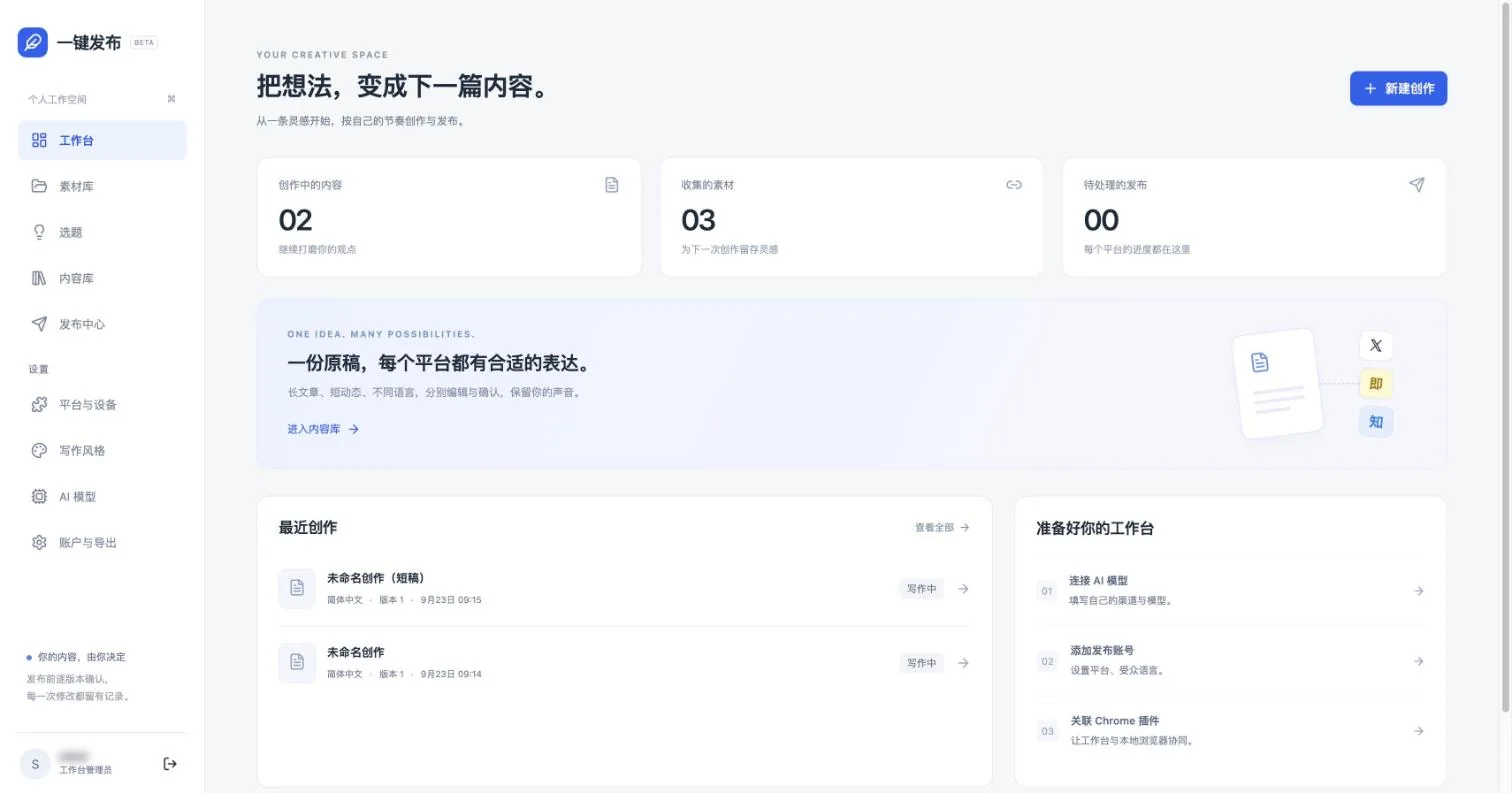
What it can do
- 01From notes to topics
Notes, links, and files go into a material library. A topic gathers materials, long and short drafts derive from it, and each generation shows which materials it drew on.
- 02A four-step writing flow
Pick a topic, outline, write the body, then adapt and confirm. A writing assistant sits beside the editor, and its candidates enter the draft only after I confirm.
- 03Writing style library
Save identity, reader, tone, structure, rules, and sample text as versioned styles, bind them to accounts, and override them on a single draft.
- 04Tick platforms and publish
After writing, tick the target platforms. Language, format, and style follow each account's settings, and any formatting loss is listed for me to confirm first.
- 05Publishing through background pages
Each task runs in a new background tab without switching your current page. X supports posts, images, threads, and long articles; steps like a CAPTCHA wait for me.
- 06Links and verification
After publishing it keeps the link, platform ID, and evidence. A post is marked publicly verified only when an anonymous fetch returns the matching text; otherwise it stays "submitted".
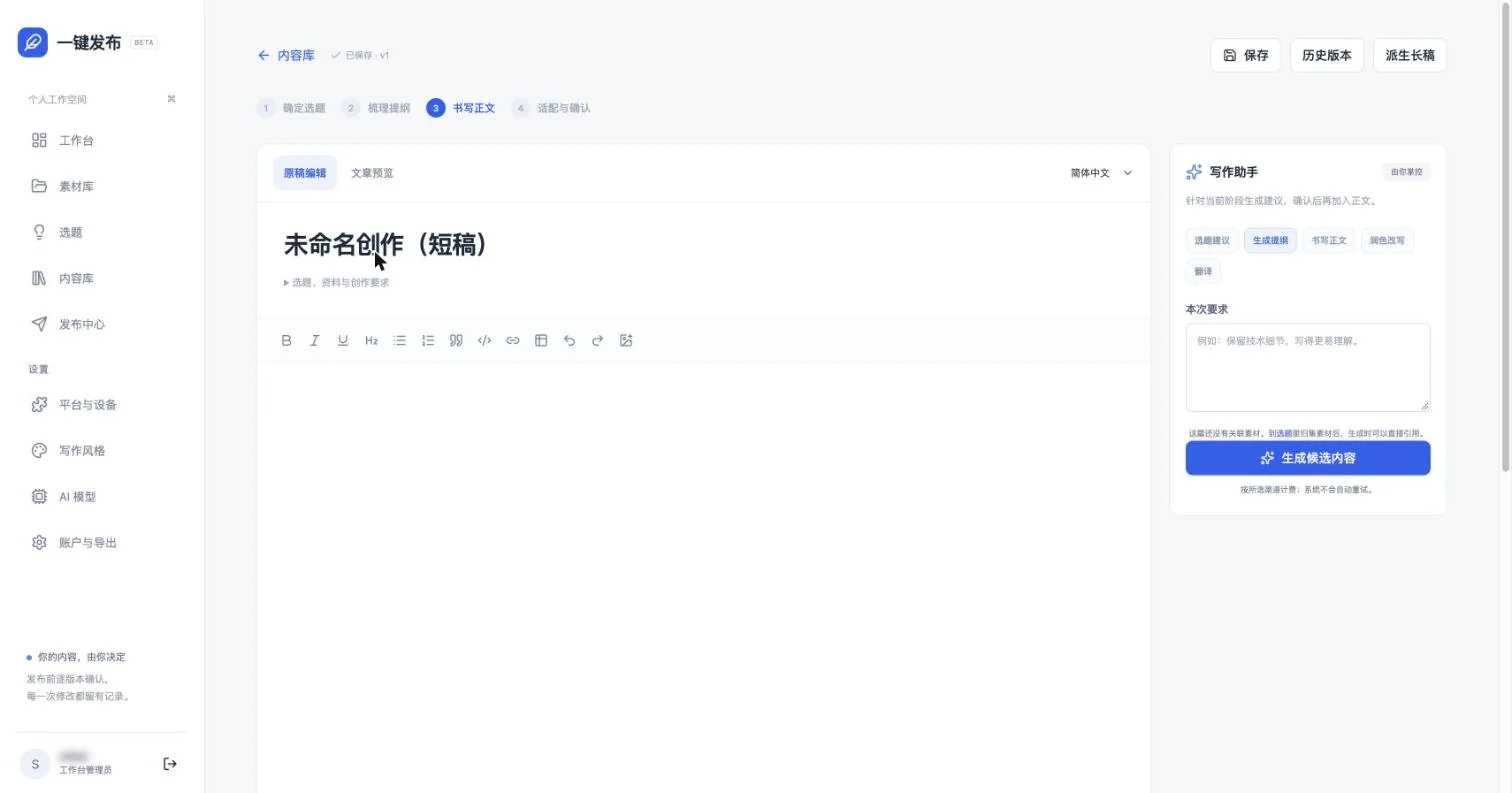
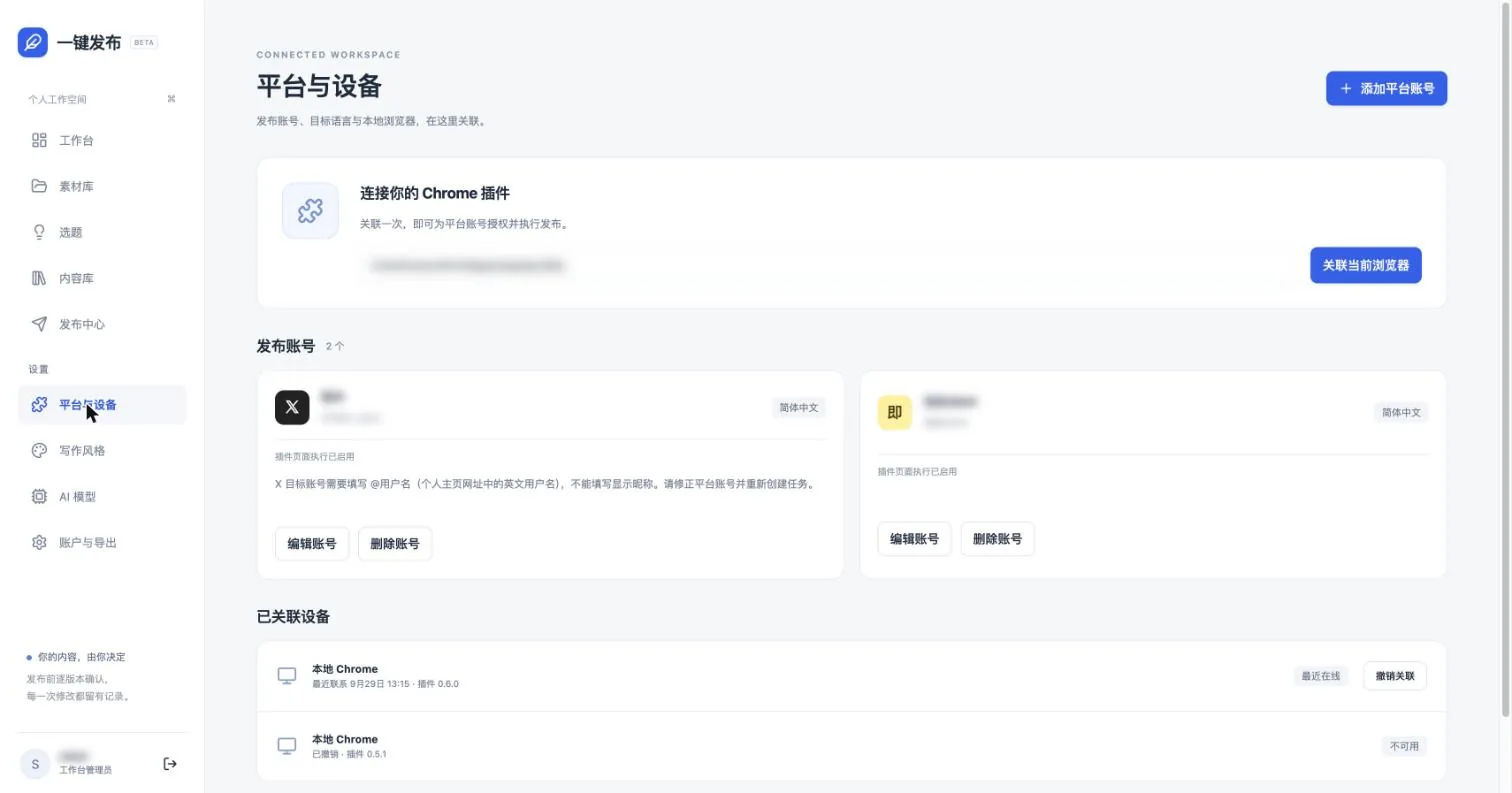
Screenshots come from the live version. Account names and the extension ID are blurred.
Why I built it
Sending one piece to X, Zhihu, DEV, WordPress, Medium, and more usually means copying, reformatting, translating, and logging in one by one, and then not knowing whether the link is really public. The more you publish, the more error-prone the routine becomes, and the easier it is to give up.
One-Click Publisher gathers material, writing, per-platform versions, publishing, and verification into one workbench: write once, adapt per platform, confirm, and let the Chrome extension finish in the background, leaving a link and evidence for every post.
How one piece goes out
- Materials and topics: gather scattered notes under a topic.
- Writing: write the main draft in a rich-text editor with autosave and version history.
- Platform versions: tick platforms, review format differences, and rewrite individually when needed.
- Confirm the plan: freeze the content, choose now or scheduled, and choose draft-only or publish.
- Execute: the Chrome extension publishes through background pages.
- Verify: check links and evidence in the publishing center, and add them manually when needed.
Supported platforms
X, Jike, Zhihu, DEV, WordPress, Medium, Tumblr, and Patreon. On Patreon it only prepares a draft; I confirm the tier on the platform and publish myself.
How it is built: how publishing executes
- Two ends, a clear split: the website (Cloudflare Workers) owns materials, topics, writing, platform versions, and task scheduling; the Chrome extension owns only the last step — page execution. Publishing happens on real platform pages: platform posting APIs are retired, and no headless browser is used, so to the platform this is a real person’s page interaction.
- Page execution has guardrails: each task opens background tabs per platform, following an OpenCLI-style flow — read the page and judge its state first, then act. Control positions from “pick on page” are stored as local CSS selectors only; no remote code runs. When the page does not match expectations, submission is blocked. X’s automatic mode must recognize the specified account first; regular tweets, images, threads (up to 25 posts), and Articles long-form are each validated before submitting.
- Platform versions are adaptations, not copies: language, content form, and with-links-or-without follow each account’s settings; format losses (length limits, lost styling) are listed before confirmation; X threads are split automatically.
- How models are used in the writing chain: related materials are injected into context by budget, and generation states which items were cited; outline, draft, rewriting, and translation each take their own default model; candidates from the writing assistant enter the draft only after I confirm; for images, the model reads the full draft to decide placement and prompts, generated and adopted one by one.
- Consistency first: content is frozen before publishing, so what goes out is necessarily the confirmed version; tasks are de-duplicated; partial success or uncertain outcomes never trigger an automatic resend — they come back to me.
Designed to be careful
- Content is frozen before publishing, so what goes out is what I confirmed.
- Tasks are de-duplicated, and partial or uncertain outcomes are never re-sent automatically.
- When a login or CAPTCHA must be handled in the foreground, the task waits for me instead of grabbing focus.
- The model decides where images go and proposes prompts; images are generated and used only after I confirm.
Boundaries
- It is a single-admin tool for my own use, with no sign-ups.
- Public posting and long-form styling on real platforms still need to be accepted account by account. Passing tests on controlled pages does not mean every platform has been tried live.