Backlink Workbench
Finding, pre-checking, submitting, and verifying, as one traceable flow
A Chrome extension that starts from a backlink library in Feishu to discover, pre-check, write, and submit blog-comment and directory backlinks, then verifies that each link is really public and clickable.
What it can do
- 01Feishu is the work base
Sites, login methods, and status live in a Feishu Base, and the extension calls the Feishu Open API directly with no local service. In zero-field mode it never creates tables or adds fields.
- 02Pre-check before acting
The pre-check only browses, identifies, and writes back, without logging in, filling, or submitting. Sites are sorted into: direct, auto-login possible, needs review, and not publishable.
- 03A quality gate for comments
Comment structure and length follow the article, with no fixed template. Anything irrelevant, templated, salesy, or without a working AI self-check is stopped; comments for the same site are de-duplicated over 180 days.
- 04Direct submit or by hand
WordPress and similar sites are submitted by fetch first, returning the real HTTP response and failure reason, then fall back to clicking the button. In manual mode I copy, fill, and submit myself.
- 05Directories too
It finds a directory's submit page and fills in name, URL, tagline, description, and category. With a CAPTCHA, a payment, or an unfillable required field it hands over to me, and rechecks listings after 1, 3, 14, and 30 days.
- 06The public result is the truth
A successful submit is not a published link. A link counts as published only when it is clickable in the public comment, lands on the promoted URL, and returns a status of 200–399.
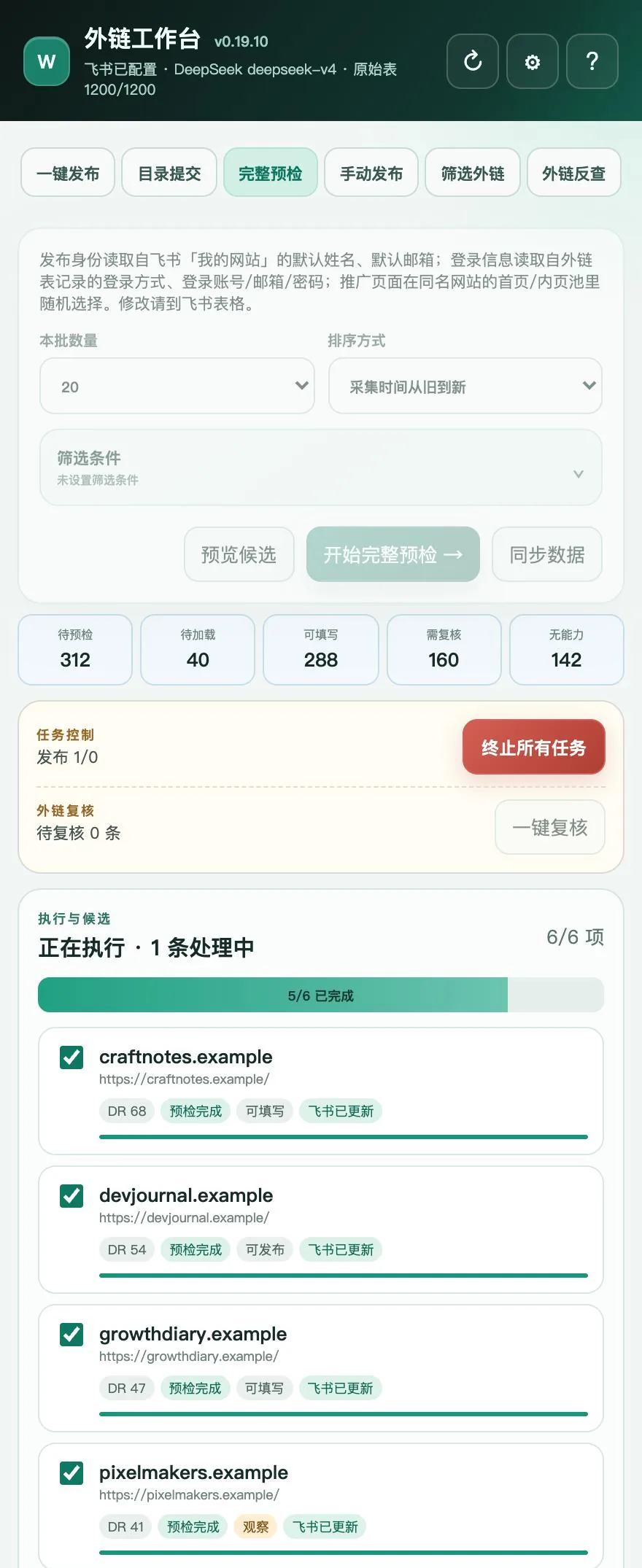
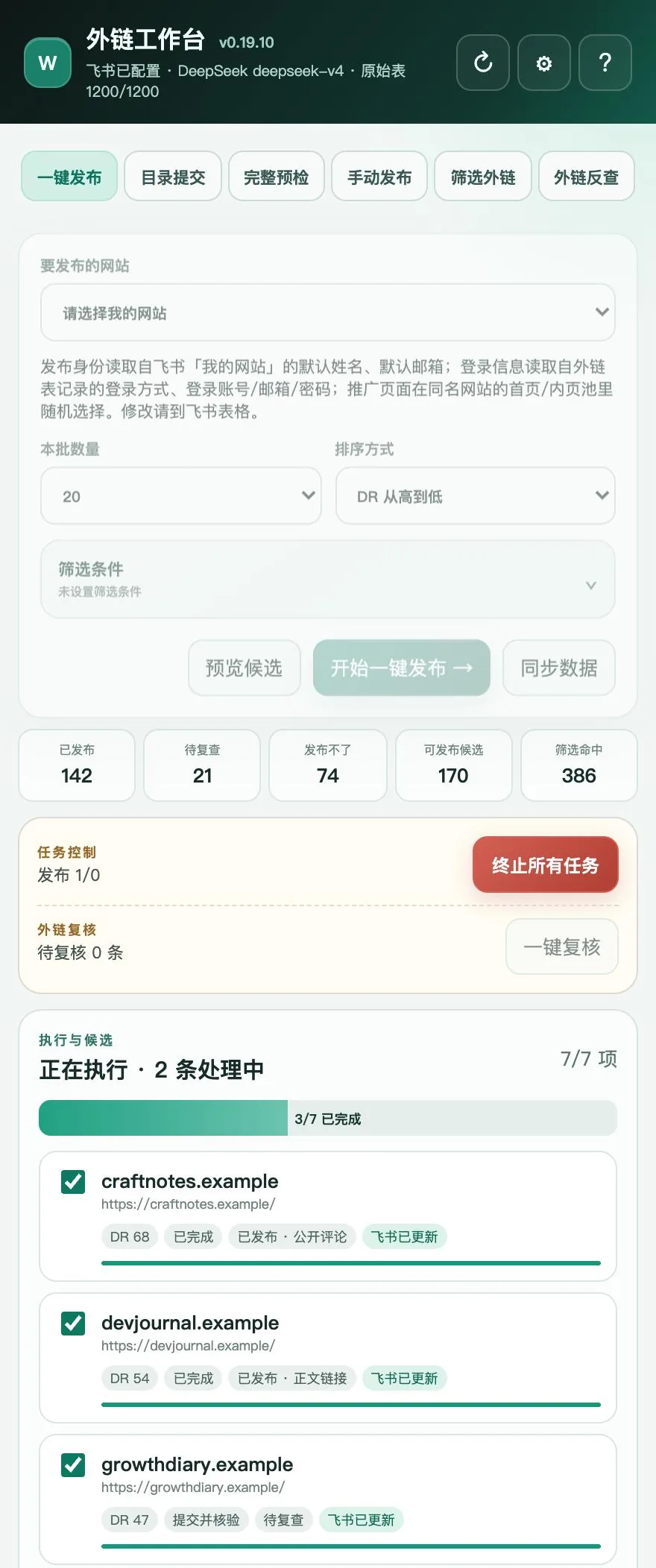
Screenshots show the extension's real interface; the sites, domains, and numbers in them are demo data.
Why I built it
The slow part of link building is not writing one comment. It is the whole run-up and follow-through: finding sites, judging whether a site takes links at all, logging in, filling forms, submitting, and finally going back to check whether the link really appeared. Rush any step and you either waste the effort or leave a low-quality comment behind.
Backlink Workbench puts that chain in the browser side panel and records each site’s state in a Feishu table. Every step leaves a trail, and every link gets a verification result.
How one batch goes
- Discover: get candidate sites from the Feishu library, an Ahrefs preview (only added after I confirm explicitly), or backlink tracing from comment sections.
- Pre-check: look without touching, and work out the site type, whether comments exist, and whether login is needed.
- Publish: once I confirm the queue, comments or directory submissions run automatically or by hand, with login decisions made in a fixed order.
- Recheck: return to the page to see whether the link is public, clickable, and lands on the promoted URL.
- Record: results, evidence, and failure reasons are written back to Feishu, and unreachable sites are skipped automatically.
How it is built: what gets automated at each step
- A pure browser extension, no server of its own: the background service worker orchestrates, content scripts read pages and fill forms, and the site library talks to Feishu Base’s Open API directly. Credentials stay in Chrome locally, and the packaged build contains no user configuration.
- Pre-check is read-only: it identifies the site type, the comment entry, and the login method, and classifies sites as directly publishable, publishable after auto-login, needs review, or unpublishable. During pre-check there is no login, no fill, no submit — look without touching. The login method trusts the human notes in Feishu first, then AI’s read of the page structure; AI results can only match existing options and never invent new fields.
- Two submission paths: WordPress-style comment forms go through direct fetch submission first, capturing real HTTP status codes and failure reasons; when direct submission is unavailable it falls back to simulated page clicks. Login decisions follow a fixed order. It stores no Google passwords and never touches 2FA or CAPTCHAs.
- Comments have hard constraints: structure and length follow the article’s actual content (usually 1–4 sentences, shorter when the content is simple), the language must match the page’s language, and link placement follows what the page supports — body link or website field. Irrelevant, templated, or salesy comments, or AI self-check being unavailable, all block release; comments on the same site are deduplicated over the last 180 days.
- The directory agent has boundaries: AI reads the page and proposes a fill plan, but fields may only use facts from the product’s own profile — anything missing stays empty; the URL can only be the product URL and the email only the contact email. A CAPTCHA, paid-only submission, or an unfillable required field hands over to me with the reason recorded, never forced.
- The verification loop closes: a successful submission does not count. The link is marked “published” only when a publicly visible comment contains a genuinely clickable link, the redirect lands on the promoted URL, and the status code is 200–399; directory submissions are re-checked automatically at 1/3/14/30 days for indexing, with the reason recorded when not listed.
The feature tabs
| Tab | What it does |
|---|---|
| One-click publish | Analyzes, writes comments for, and submits a batch of candidates |
| Directory submit | Handles only records marked as directories in Feishu |
| Full pre-check | Browses and writes back only; no login, fill, or submit |
| Manual publish | Prepares the comment, identity, and page fill; I submit myself |
| Filter backlinks | After Ahrefs confirmation, adds new candidate URLs to the library |
| Backlink tracing | Pulls commenters’ links from blog comments to find more platforms of the same kind |
Boundaries
- It does not store Google passwords, and it does not bypass 2FA, CAPTCHAs, paywalls, anti-spam, or Ahrefs limits.
- It does not ask for dofollow, and it does not sidestep a site’s nofollow or ugc handling.
- When it meets a CAPTCHA, payment, or email confirmation it cannot handle, it hands over to me instead of forcing through.
- Site credentials such as an email are kept in Chrome’s local storage, not in the system keychain.
- Every feature tab is still labeled “in testing”, and I load and use it locally.