Keyword Discovery
Turning manual keyword hunting into an automatic pipeline
A Chrome extension that starts from root keywords in Feishu, discovers related queries recursively through Google Trends, validates them on search results and Ads Keyword Planner, and writes the results back to Feishu.
What it can do
- 01Roots in, results out
Start from roots in Feishu or typed by hand. It handles related-query discovery, trend judgment, and search validation, then writes results back to a Feishu table.
- 02Recursive discovery
Walks down Google Trends related queries level by level, up to 3 levels, with no word-count limit on long-tail terms, so clues are not dropped for being long.
- 03Graded trends with reasons
A six-level rule grades each term and records why. Rejected terms get a second look against a 7-day average, which can add qualifying terms but never knocks out ones that already passed.
- 04Skips whole sentences
Related queries that are clearly whole sentences (question marks, quiz options, very long, clauses; at least two signals) are filtered by rule with the reason recorded, saving useless lookups.
- 05Quiet in the background
Research runs in a "keyword research" tab group in the current window, without pulling you away from the page you are reading or needing you to babysit it.
- 06Works with the observer
It can pick up keywords Opportunity Observer selected for the day, check each one, and send results back. Failed sends stay in a local queue to retry.

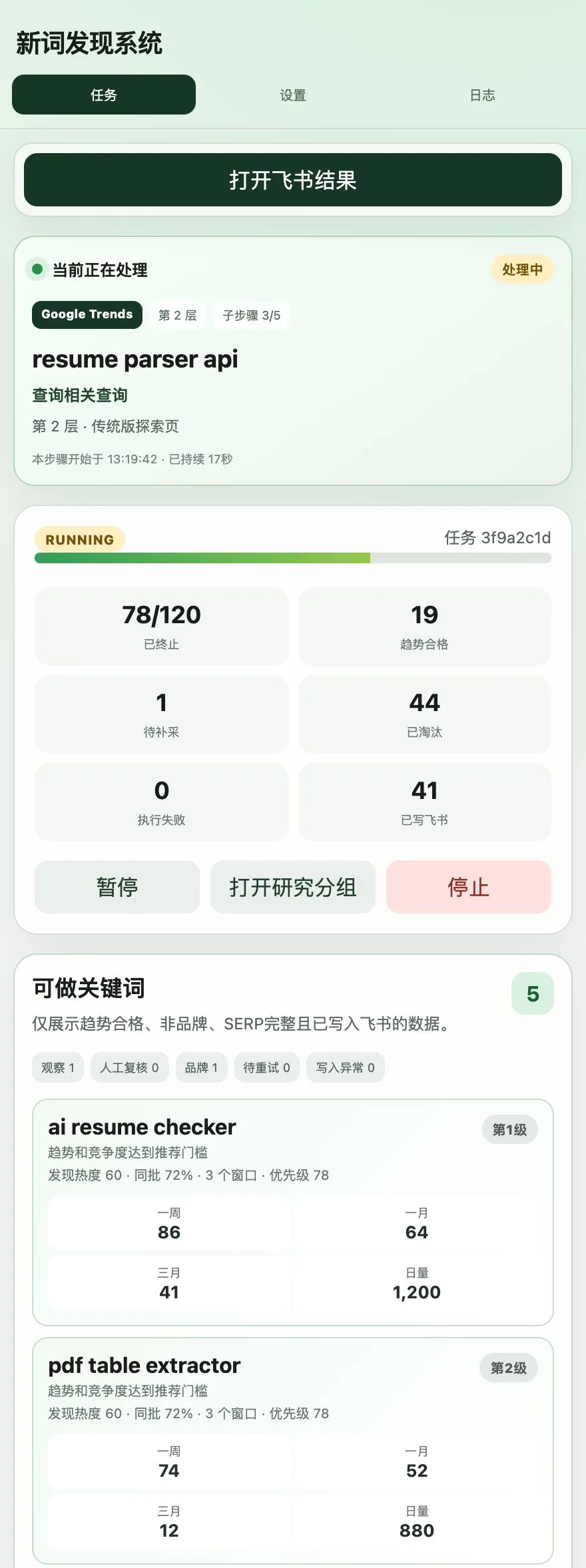
Screenshots show the extension's real interface; the keywords and numbers in them are demo data.
Why I built it
Checking new keywords by hand is fiddly: open Trends to read the curve, click related queries, search each one, note it in a sheet. As volume grows, the standard drifts too: a term I would have kept yesterday gets waved through today.
This extension turns it into a pipeline. Root keywords go in; results with a trend verdict and search data come out and land straight in Feishu. The rules are fixed, so every term has a recorded reason for staying or going.
The pipeline
- Read root-keyword tasks from Feishu, or type roots by hand.
- Look up related queries on the classic Google Trends Explore page and recurse by rule.
- Grade each term’s trend and record the reason, including follow-up conclusions such as the smoothed recheck.
- Check terms that pass on search results and Ads Keyword Planner.
- Write results back to Feishu. Filtered terms keep their reasons for later checking.
How it is built: what each stage does
- Orchestration: the service worker runs the whole task; research executes in a background “keyword research” tab group inside the current browser window, never switching away from the page I am on. Background tabs are told the page is visible — the classic Trends page loads related queries only when visible, and the trend rules are tuned to the classic page’s hourly curve granularity, so the pipeline sticks to the classic page end to end.
- Recursive discovery: root term → related queries on the classic Explore page → down level by level, at most 3 levels. Long-tail terms have no word-count limit; but obvious full sentences (question marks, quiz options, unusual length, subordinate clauses, “pronoun + verb” — at least two pieces of evidence) are rule-filtered with the reason recorded, saving query quota.
- Trend grading is rule-based: the six-level rules run first; terms that fail then get a smoothed recheck against 7-day moving averages — it can only add passing terms, never knock out ones that already passed. Every term keeps a written reason for staying or going; Feishu only receives passing terms, while filtered terms stay on file with their reasons.
- Search validation: passing terms continue to search results and Ads Keyword Planner, and only then get written back.
- Rate-limit self-healing: on a 429 or “sent too many requests”, a control term is queried first to tell real throttling from a problem with just this term; once throttling is confirmed, the task pauses for 30 minutes, doubling on consecutive hits up to 4 hours, and interrupted terms go back to the queue without counting as retries.
- Landing the results: written back to a Feishu base; when working with the observer, terms are queried and returned one by one, and failed sends stay in a local queue for later retry.
Where AI sits in this pipeline: AI only assists and never touches the trend verdict — grading is computed entirely by rules. After two consecutive AI failures, the toolbar icon shows a red exclamation mark with the reason instead of quietly degrading; terms claimed from the observer never call AI at all.
Deliberate trade-offs
- Classic Trends only: the new page loads related queries only while on screen and uses a different curve granularity. The trend rules are tuned to the classic page’s data, so the extension sticks to it.
- Waits out rate limits by itself: when Google throttles, it cools down and resumes on time, and interrupted terms do not count against retries.
- AI is only an aid: after two failures in a row, the toolbar icon shows a red exclamation mark with the reason instead of quietly degrading.
Boundaries
- Credentials stay in Chrome on this machine, and the packaged build contains no user configuration.
- Ads Keyword Planner must be enabled separately with its own site permission.
- For now I load and use it locally.